Best Tools for Analyzing Customer Service Interactions



Tuesday, August 4, 2026


Best Tools for Analyzing Customer Service Interactions


View the podcast on Youtube

Every support ticket, chat transcript, and call recording holds a signal about why customers stay or leave. Most teams just never see it in time.
Customer service analytics tools collect and analyze data from support interactions, including tickets, calls, chats, and post-interaction surveys, to reveal patterns in sentiment, resolution speed, and recurring issues. They turn scattered conversations into a picture of what's actually happening between your team and your customers.
Eight of the top options are broken down next, along with the categories they fall into and how to figure out which one actually fits the problem you're trying to solve.
What Are Customer Service Analytics Tools?
Customer service analytics tools capture data from every customer support interaction and organize it into metrics teams can act on: sentiment trends, first-response time, resolution rate, repeat contact reasons, and agent performance. Instead of relying on a supervisor spot-checking calls or a CSAT score in isolation, these platforms give a full view of what's driving customer satisfaction or frustration.
Most customer service analytics software falls into one of a few buckets. Some are built into helpdesk platforms and track ticket-level metrics. Others analyze the actual language of a conversation for sentiment and intent. Some are pure survey tools that measure how customers felt after the fact. And a smaller group connects all of it, along with data from CRM, sales, and product systems, into one place so the insight actually reaches the people who can act on it.
The right fit depends less on which tool has the longest feature list and more on what question you're trying to answer. That might mean figuring out why resolution times are slipping, tracing whether a specific product issue is driving repeat contacts, or catching a support pattern that's already signaling churn risk in an account your CS team hasn't flagged yet.
Why Analyzing Customer Service Interactions Matters
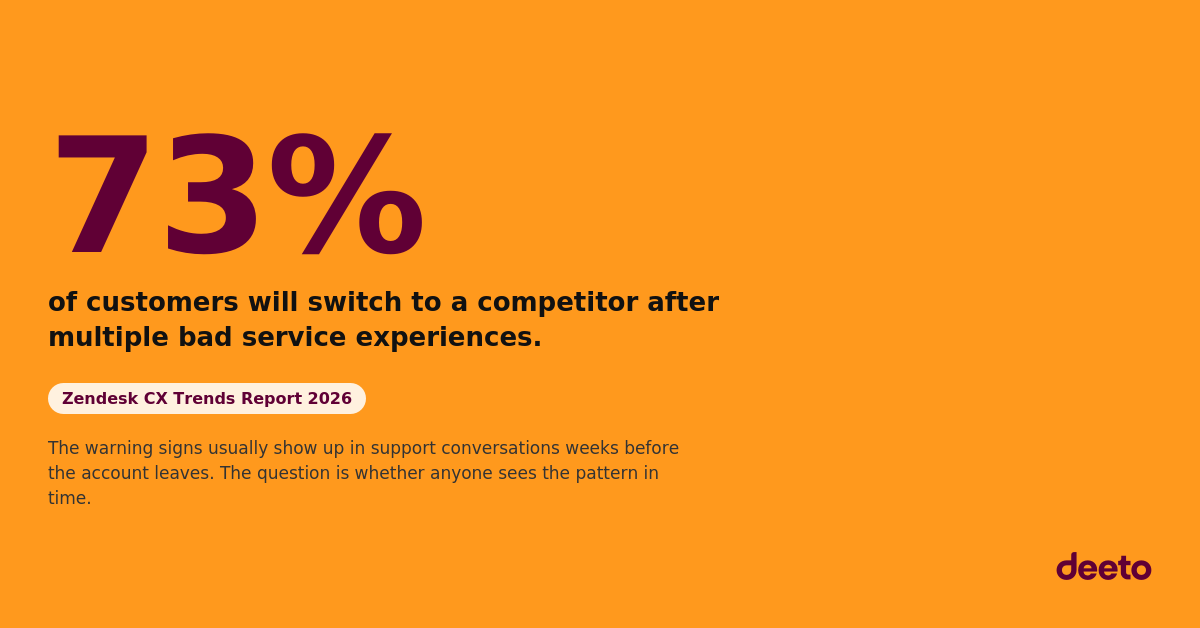
Support interactions are one of the richest, least examined sources of customer truth a company has. Nearly three in four customers say they'll leave a company after a handful of bad experiences, according to Zendesk's 2026 CX Trends Report. That's rarely one dramatic failure. It's usually a pattern that shows up across tickets weeks before a renewal conversation goes sideways.
Support data usually lives in one system, sales context lives in another, and nobody connects the two until a deal or renewal is already at risk. The data exists. It just doesn't talk to itself.
That gap is exactly where customer service analytics earns its keep. When support conversations are analyzed for sentiment, churn signals, and root cause, teams stop reacting to complaints after the fact and start catching the pattern while there's still time to act.
Types of Customer Service Analytics Tools
Before comparing individual platforms, it helps to know which category actually matches your problem.
- Helpdesk-native analytics: Built into a ticketing system, tracking resolution time, ticket volume, and CSAT within the tool teams already use to manage support.
- Conversation intelligence: Analyzes the language of calls, chats, and messages for sentiment, intent, and recurring topics, often with real-time agent guidance.
- Voice of customer (VoC) and survey platforms: Capture structured feedback through NPS, CSAT, and CES surveys, tracking satisfaction trends over time.
- Behavioral and digital experience analytics: Tracks how customers interact with a website or product, useful for diagnosing friction that shows up later as support tickets.
- Unified customer intelligence: Connects support, sales, product, and survey data into one system so insight reaches the teams responsible for retention, product, and revenue decisions, not just the support team.
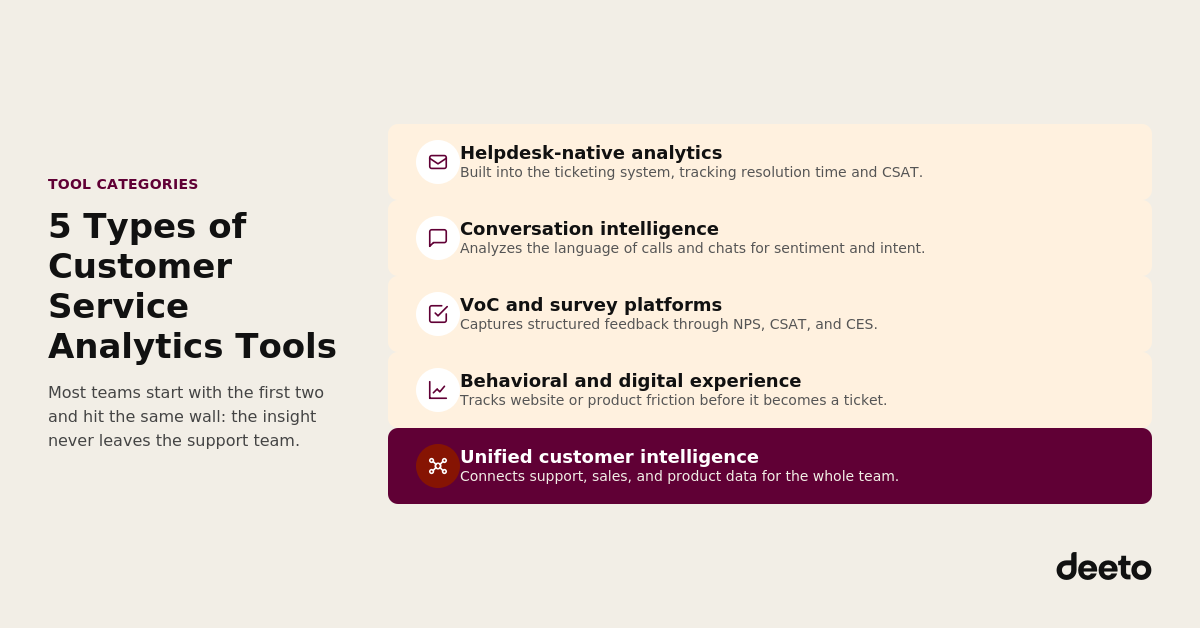
Most companies start with the first two categories and hit a wall at the same point: the insight stays inside the support team. A pattern that would matter enormously to product or customer success never leaves the helpdesk dashboard, even though support is just one stop on a much longer customer journey.
That gap has a real cost, and it shows up in specific ways. A CSM finds out an account is frustrated on the renewal call instead of three tickets earlier, when there was still room to fix it. A support lead loses an afternoon exporting tickets into a spreadsheet to manually prove a pattern a system should have flagged on its own. A product roadmap gets built on the two loudest complaints in a Slack channel instead of the fifty quieter ones already sitting in the helpdesk, because nobody had time to pull them. Each of those is a routing failure dressed up as a data problem, and it's exactly what separates the tools below.
8 Best Tools for Analyzing Customer Service Interactions
Here's how the leading options compare across category, best-fit use case, and standout capability, and where each one leaves that gap open or closes it.
Zendesk
Zendesk is best known as a helpdesk platform, and its analytics are built directly into that workflow. Pre-built dashboards track ticket volume, resolution time, and CSAT without needing a separate tool. Post-interaction surveys capture satisfaction shortly after a ticket closes, and support trend reports show how human and AI agent performance shifts over time.
Zendesk doesn't analyze behavior outside the helpdesk or unify data with CRM and sales systems on its own. For teams that manage support entirely inside Zendesk and don't need that data connected elsewhere, the built-in analytics cover the basics well.
Fullstory
Fullstory analyzes digital behavior, capturing how customers move through a website or product before, during, and after they contact support. Its autocapture technology logs interactions automatically, so teams can go back and review friction points like rage clicks or abandoned flows without having to define what to track in advance.
Fullstory is a strong fit for product and UX teams trying to catch the friction that generates support tickets in the first place. It's less suited to analyzing the language or sentiment inside an actual support conversation.
Qualtrics
Qualtrics focuses on structured feedback collection at enterprise scale. Its survey infrastructure supports NPS, CSAT, and CES programs across digital, in-person, and contact center touchpoints, with AI-powered follow-up questions that push past shallow responses to get more useful detail.
Qualtrics's core strength is structured survey data, not conversation analysis. It has added contact center intelligence that tags call transcripts and chat logs with topic and sentiment data, but that's a newer, more limited layer sitting on top of the platform rather than its specialty, and connecting any of it to CRM or performance data still takes additional integration work.
Medallia
Medallia combines survey feedback with passively collected signals like time on page and basic behavioral data, giving a broader view of experience across brands and channels. Its text analytics surface recurring themes across open-ended survey responses, reviews, and chat transcripts.
Medallia works well for large, multi-brand organizations consolidating feedback across many touchpoints. It requires more setup and doesn't include the deeper conversation intelligence found in dedicated contact center analytics tools.
CallMiner
CallMiner is built around omnichannel interaction analysis, covering voice, chat, email, and SMS for sentiment, topics, and compliance patterns. Its RealTime feature provides live agent guidance during calls based on conversation context.
CallMiner is built for enterprise contact centers with dedicated analysts who can configure categories and interpret conversation data. It doesn't provide CCaaS infrastructure or workforce management on its own, so it works best layered into an existing stack.
AmplifAI
AmplifAI unifies survey feedback, conversation data, QA evaluations, and performance metrics into role-specific dashboards, connecting customer sentiment directly to agent coaching. Its survey-to-performance correlation ties NPS and CSAT scores back to the specific behaviors and call reasons that produced them.
AmplifAI works best for contact centers focused on turning customer insight into coaching action. It's built for internal performance management rather than surfacing customer intelligence to sales, marketing, or product teams.
Salesforce (Tableau + Data 360)
Salesforce approaches customer service analytics through data unification rather than a single purpose-built tool. Data 360 pulls information from CRM, support, and marketing systems into one place, while Tableau turns that combined dataset into custom dashboards and visualizations.
This combination gives technical teams a flexible way to build exactly the reporting they need, but it requires configuration and ongoing maintenance. There's no out-of-the-box view of support sentiment or churn signals until someone builds it.
Deeto
The seven tools above analyze customer service data, each within its own channel or category. Deeto takes a different starting point. It takes what those tools surface, and what support conversations reveal on their own, and routes it to the teams positioned to act on it.
A helpdesk tool tracks resolution time. A conversation intelligence platform flags call sentiment. Both stop at the edge of the support team. Deeto's Analyze module picks up from there, identifying sentiment, patterns, and churn signals across every customer touchpoint, including support conversations, and connecting them to the sales, customer success, and product context already sitting in the platform. It isn't a ninth analytics dashboard competing for the same shelf space. It's the layer that decides where a signal goes once it exists.
A support ticket that mentions frustration with a specific feature doesn't just get logged. It surfaces as a customer sentiment signal that a CS manager can see next to renewal timing, or a churn risk indicator that reaches the right person while there's still time to intervene, before momentum is lost and the account is already gone.
Deeto is built for teams on the customer success side who need support sentiment connected to the rest of the customer story, not filed away in a support dashboard only the support team ever opens. Pick any tool above to capture the signal. Deeto is what makes sure it actually reaches someone.
Key Features to Look for in a Customer Service Analytics Tool
Once you've narrowed down which category fits your problem, evaluate individual tools against these capabilities.
- Sentiment and text analysis: The tool should identify sentiment and recurring themes in the actual language of a ticket, chat, or call, not just track surface metrics like resolution time.
- Cross-channel coverage: Support happens across email, chat, phone, and social. A tool that only sees one channel misses the full picture.
- Real-time alerts: Waiting for a monthly report to learn that a product issue is spiking defeats the purpose. Look for tools that flag emerging patterns as they happen.
- Integration with CRM and CS systems: Support data is far more useful sitting next to account, renewal, and product context than isolated in a helpdesk.
- Role-based delivery: A CS manager, a product lead, and a support supervisor all need different views of the same underlying data.
- Closed-loop action: The strongest tools connect insight directly to a coaching session, a roadmap decision, or a retention play, not just a dashboard nobody revisits.
How to Choose the Right Tool for Your Team
Start with the question you're trying to answer, not the feature list. A tool with dozens of capabilities is wasted if it doesn't answer the specific question keeping you up at night, whether that's declining CSAT, rising churn, or agents spending too long on repeat issues.
Map where your customer data currently lives. Support tickets in one system, survey responses in another, CRM data in a third. The more of that a tool can connect natively, the less manual work your team does stitching reports together later.
Confirm the insight actually reaches the right team. A pattern buried in a support dashboard doesn't help a CS manager preparing for a renewal call. Ask whether the tool delivers insight to sales, CS, and product, or whether that handoff is still manual.
Run a real pilot before committing. Test the tool against a specific use case, like flagging at-risk accounts or identifying a recurring product complaint, and measure whether it actually surfaced something your team would have missed otherwise.
Common Challenges in Customer Service Analytics
The most common failure point is fragmentation, not a lack of data. Support data sits in a helpdesk, survey data sits in a VoC tool, and CRM data sits somewhere else entirely, and nobody owns connecting them.
The second failure point is timing. A churn signal buried in a support ticket is only useful if someone sees it before the renewal conversation, not during the post-mortem after the account leaves.
The problem isn't collecting customer service data. The problem is connecting it to the decisions it's supposed to inform, before those decisions get made without it.
Key Takeaways
- Customer service analytics tools fall into distinct categories: helpdesk-native, conversation intelligence, VoC/survey, behavioral, and unified customer intelligence.
- Nearly three in four customers leave after multiple bad experiences, and most of the warning signs show up in support conversations weeks before a renewal decision.
- The strongest tools turn support data into something sales, CS, and product can act on together, instead of leaving it in a report only support sees.
- Choosing the right tool starts with the specific question you need answered, not the longest feature list.
- Deeto sits above the tools in this list rather than alongside them: it's the layer that routes support sentiment and churn signals to CS, sales, and product so they see the same picture at the same time.
FAQs
What are customer service analytics tools?
Customer service analytics tools capture and analyze data from support interactions, including tickets, calls, chats, and surveys, to reveal sentiment trends, resolution performance, and recurring issues. They help teams understand what's driving customer satisfaction or frustration instead of relying on isolated metrics like average handle time.
How is customer service analytics different from customer experience analytics?
Customer service analytics focuses specifically on support interactions, like tickets, calls, and chats. Customer experience analytics looks more broadly at behavior across a website, app, or product. Many companies need both, since a support pattern often traces back to a friction point in the product itself.
Can customer service analytics tools predict churn?
Some can. Unified customer intelligence platforms that connect support sentiment to account and renewal data can flag churn risk earlier than a support ticket volume alone would suggest. Tools that only track helpdesk metrics in isolation typically can't make that connection without additional integration.
What features matter most when choosing a customer service analytics tool?
Sentiment analysis, cross-channel coverage, real-time alerts, and integration with CRM or CS systems matter most. Just as important is whether the tool delivers insight to the teams who can act on it, rather than leaving it inside a support dashboard only the support team sees.
How much do customer service analytics tools cost?
Pricing varies widely by category. Helpdesk-native analytics are often included in existing support software. Enterprise VoC and conversation intelligence platforms usually price per agent or per usage, scaling with team size. Unified customer intelligence platforms are usually priced based on the number of connected data sources and users.
Conclusion
Support conversations tell you more about customer health than almost any other data source, but only if that signal reaches the people who can act on it. The right customer service analytics tool depends on the specific problem in front of you, whether that's diagnosing friction, tracking sentiment, or coaching agents.
For teams that need support sentiment connected to the sales, CS, and product context that turns a signal into a decision, that's exactly where Deeto was built to help. See how Deeto connects customer signals to action.
🎉 Save your spot
Register for the event
Once your spot is secured, we’ll send your confirmation details.
Subscribe to our newsletter
Subscribe to receive the latest blog posts to your inbox every week.
By subscribing, you agree to our Privacy Policy
Subscribe to our newsletter
Get the latest news and updates from our team.
By subscribing, you agree to our Privacy Policy
Related posts

6 Best Tools for AI Customer Interviews

What are AI customer interviews? Compare 6 tools, see what each does best, and learn how to choose one.

6 Best Customer Testimonial Software Platforms
What is customer testimonial software? Compare six platforms by price, format, and fit for B2B teams.

Best customer intelligence tools for B2B teams
What are customer intelligence tools? Compare 8 B2B options, collection methods, and how to pick the right fit.