Setting Up Deeto Al Interview Agents


Tuesday, January 6, 2026
The Evolution of Customer Voice Collection
Deeto's campaign system has always made it easy to gather customer insights through questionnaire-based campaigns—structured Q&A forms that capture specific feedback at scale. Now, we're introducing something transformative: AI Interview Agent Campaigns—a new way to have natural, personalized conversations with your customers that uncover insights you'd never think to ask about.
What Makes AI Interview Campaigns Different?
Traditional questionnaire campaigns are excellent for structured data collection. You know exactly what you want to ask, and you get consistent, comparable responses. AI Interview Campaigns take a fundamentally different approach.
Instead of fixed questions, an AI Interview Agent conducts a dynamic, conversational interview with each participant. The AI adapts its questions based on responses, follows interesting threads, and digs deeper into areas that matter—just like your best human interviewer would, but available 24/7 and at scale.
Setting Up Your AI Interview Campaign
Follow these steps to launch your first AI Interview Campaign:
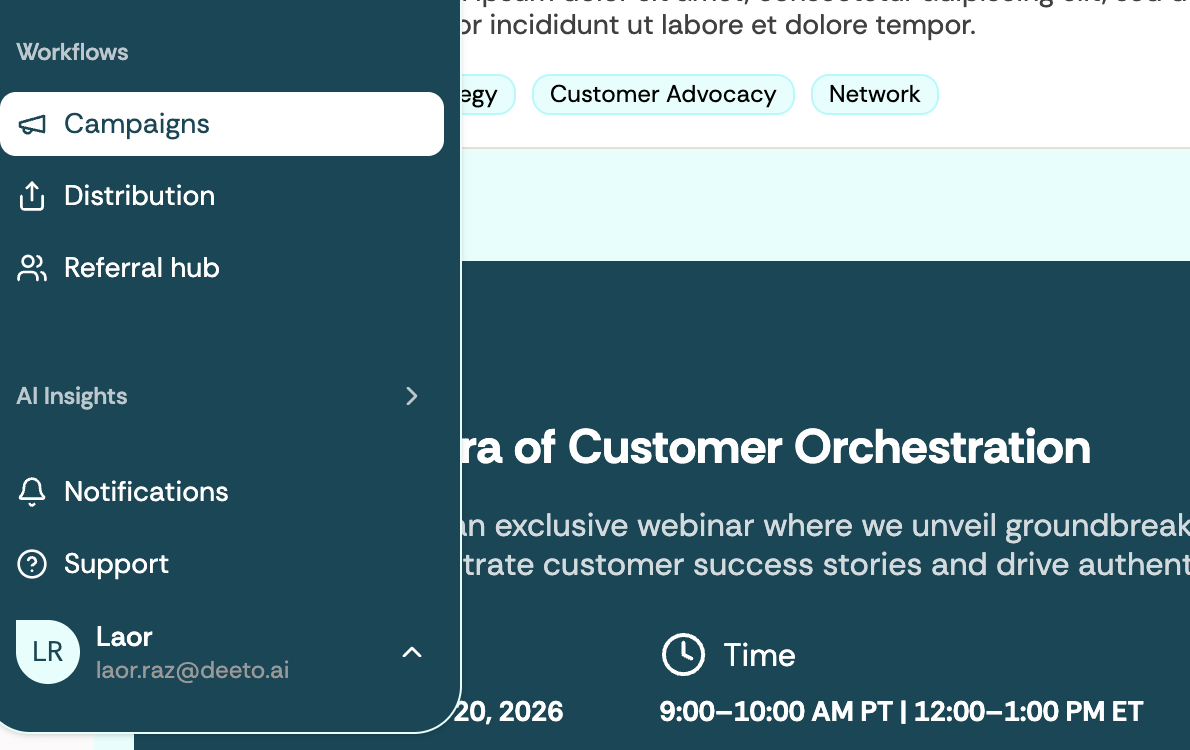
Step 1: Navigate to Workflows → Campaigns
From your Deeto dashboard, click on Workflows in the main navigation. This is your command center for all customer engagement activities. Select Campaigns to view your existing campaigns or create a new one.
Step 2: Choose Your Campaign Type
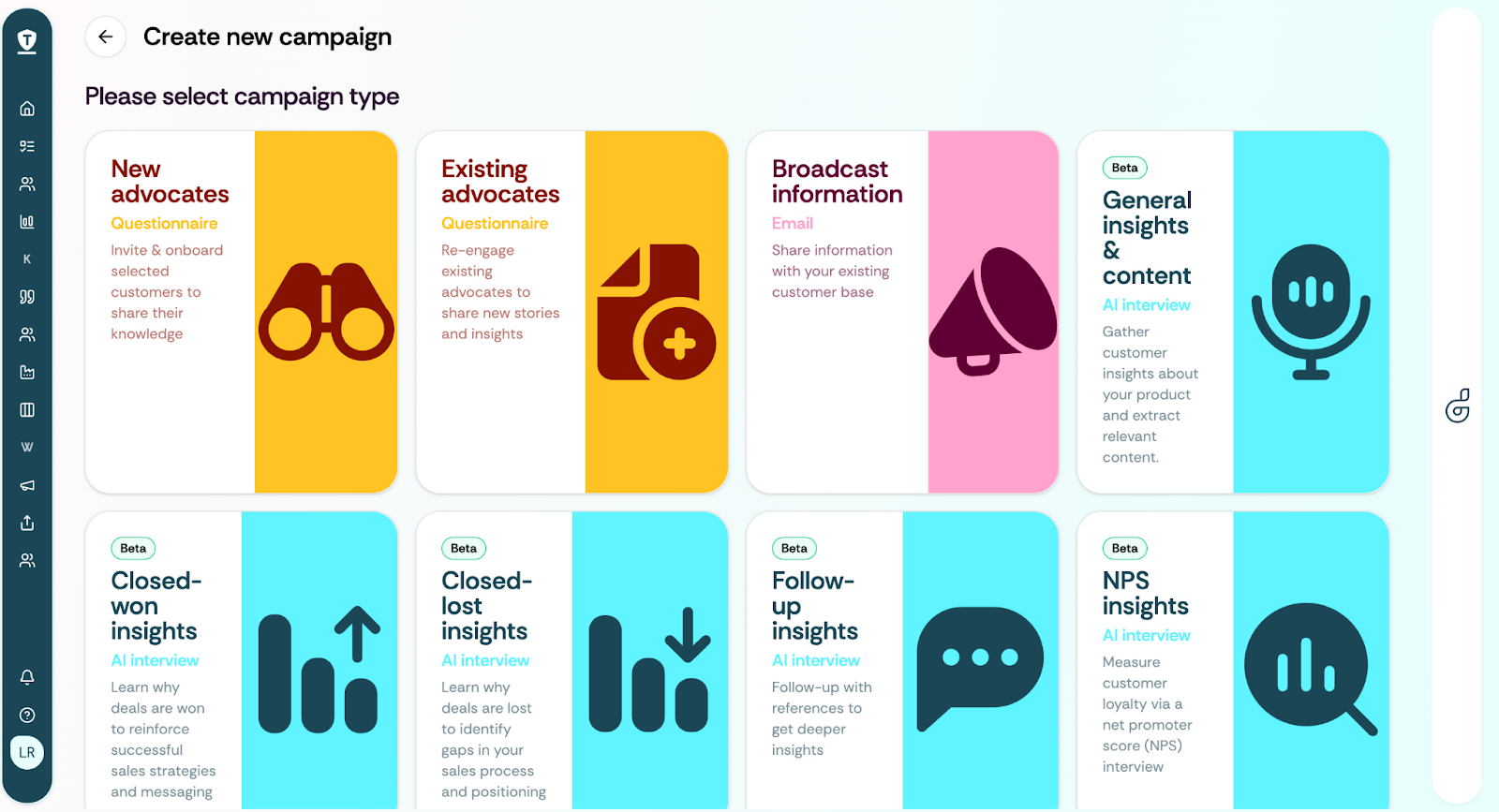
When creating a new campaign, you'll be prompted to select your campaign type based on your use case. You'll see two primary options:
- Questionnaire Campaign — Traditional Q&A forms with predefined questions for new or existing advocates
- AI Interview Campaigns — Dynamic, conversational interviews powered by AI with several use-cases
Select the relevant AI Interview Campaign to proceed. You can choose specialized interview types (tailored for specific use cases like win/loss analysis, retention, etc.) or the general interview agent (adaptable to various personas based on their personal information).
Step 3: Configure Your Audience
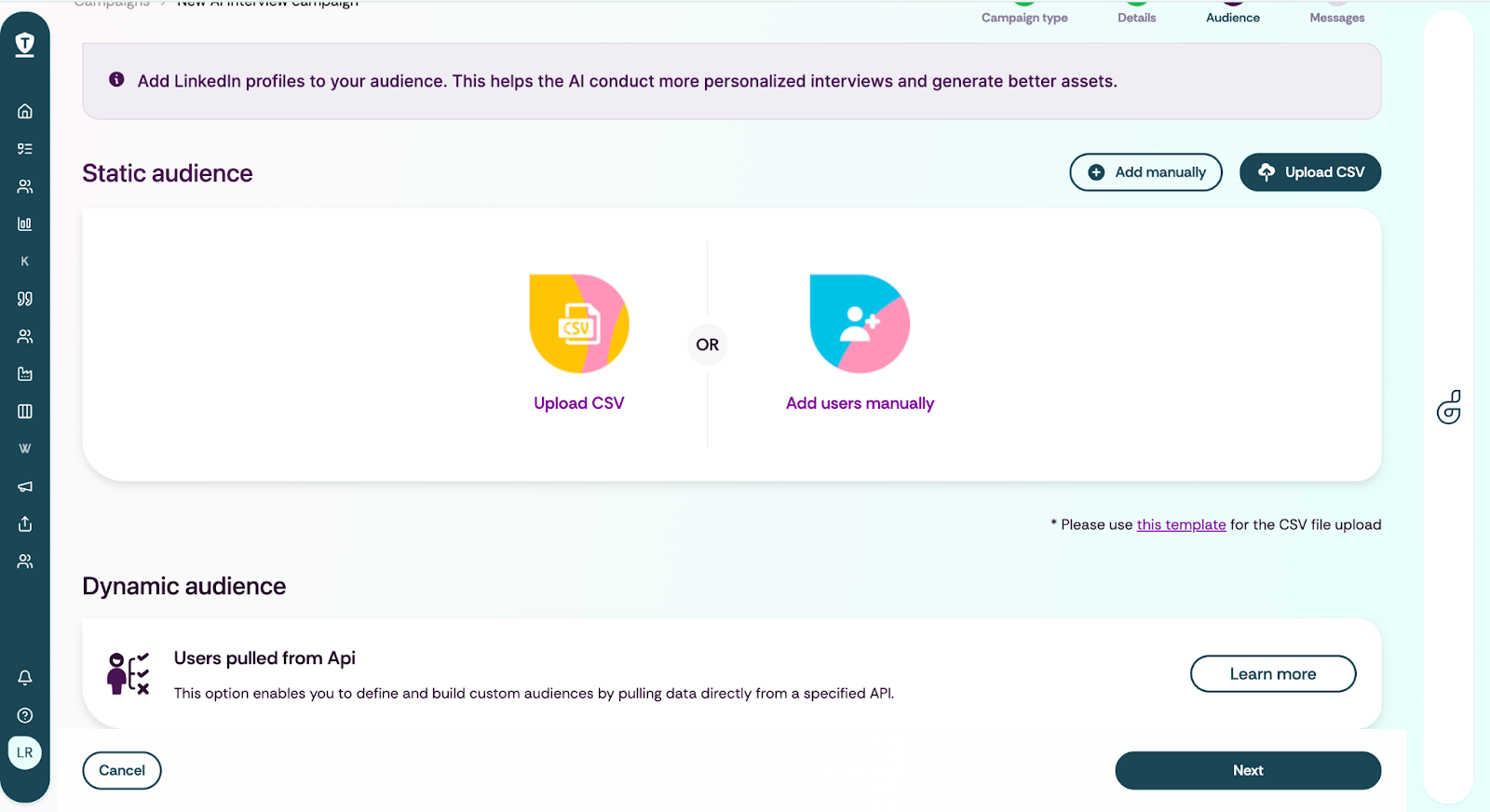
This is where AI Interview Campaigns become powerful. When uploading your audience—whether via CSV or by selecting existing contacts—make sure to include LinkedIn profile links for each participant.
💡 Why LinkedIn Matters
The AI Interview Agent uses LinkedIn profile data to personalize each conversation. It learns about the participant's role, company, industry experience, and professional background—allowing it to ask more relevant questions and build natural rapport. This personalization dramatically improves response quality and participant engagement.
Audience Options:
- CSV Upload — Upload a list with name, email, company, and LinkedIn URL columns
- Existing Contacts — Select from your Deeto people pool (ensure LinkedIn profiles are populated)
- Dynamic Audience (CRM Triggers) — Set up evergreen campaigns that automatically enroll contacts based on CRM events (e.g., closed-won deals, renewal milestones, onboarding completion)
Step 4: Schedule Your Launch
Once your audience is configured, set your campaign timing. You can launch immediately or schedule for a specific date and time. For dynamic audience campaigns, the campaign runs continuously, automatically reaching out to new contacts as they meet your trigger criteria.

Pro Tips for AI Interview Success
- Complete LinkedIn Data — The more complete the LinkedIn profile, the better the personalization. Encourage contacts to keep their profiles updated.
- Use Dynamic Audiences for Scale — If you're running ongoing programs (customer success stories, quarterly reviews), dynamic CRM-triggered campaigns ensure you never miss an opportunity to capture feedback.
- Review Generated Content — Every AI interview automatically generates usable content. Check your Assets tab in the Knowledge Hub to review, refine, and publish.
- Combine Campaign Types — Use questionnaires for quick NPS data and AI interviews for deep-dive case studies. They complement each other.
Ready to launch? Head to Workflows → Campaigns and start your first AI Interview Campaign today.
Table of contents
Subscribe to our newsletter
Subscribe to receive the latest blog posts to your inbox every week.
By subscribing, you agree to our Privacy Policy